Best Audio Mixer for Streaming: Pupgsis Gaming Mixer Review
Pupgsis gaming audio mixer and interface with a 1/4-inch mic input for streaming and podcasts. Setup, sound, RGB, pros and cons.
 ▶ YouTube
#ad · Heads up: this post contains affiliate links. As an Amazon Associate we earn from qualifying purchases — at no extra cost to you. It funds our own questionable purchases. Full disclosure.
The Pupgsis Gaming Audio Mixer is the best budget audio mixer for streaming in 2026, giving solo creators a 60 dB preamp, 48 V phantom power, and hardware voice effects over USB-C for under $60.
Why a Dedicated Audio Mixer Beats Motherboard Audio for Streaming
A dedicated USB audio mixer provides hardware-level gain control, phantom power for condenser microphones, and real-time monitoring with near-zero latency, eliminating the digital noise floor and driver conflicts common with motherboard 3.5 mm jacks. Most integrated Realtek codecs cap at 16-bit/48 kHz and introduce electromagnetic interference from GPU coils, while a purpose-built mixer operates at 24-bit/48 kHz with a dedicated analog-to-digital converter.
Motherboard audio is the “good enough” trap. The Realtek ALC4080 on a $300 board still shares a ground plane with your GPU’s VRMs, so every frame render leaks a faint whine into your mic. A standalone mixer isolates the analog stage completely. Streamers upgrading from onboard audio typically measure a 12–18 dB reduction in noise floor, turning a “buzzy” bedroom broadcast into a broadcast-grade signal without buying a separate interface and preamp. That’s the difference between viewers hearing your mechanical keyboard and viewers hearing only you.
Key advantages of a dedicated mixer:
- Hardware gain knob — tactile, instant, no menu diving
- 48 V phantom power — required for any condenser mic (AT2020, Rode NT1)
- Direct monitoring — zero-latency headphone feed, critical for vocal timing
- Balanced XLR input — rejects hum over cable runs longer than 3 meters
- USB Audio Class 2.0 — driverless on Windows 10/11, macOS, Linux, iPadOS
How to Choose the Right Budget Mixer for Your Setup
Start by confirming USB class-compliant operation so the device works on Windows 10/11, macOS, and Linux without proprietary drivers, then verify the preamp gain range covers your microphone — dynamic mics like the Shure SM58 need 50–60 dB of clean gain, while condensers require 48 V phantom power. Check I/O count, latency, and form factor to match your streaming workflow.
Decision checklist (print this, stick it on your monitor):
- USB Audio Class 2.0 — driverless on every OS
- Preamp gain ≥ 55 dB — covers SM7B, PodMic, RE20 without a Cloudlifter
- Phantom power switch — 48 V, not 12 V or 24 V
- Round-trip latency ≤ 10 ms — anything higher feels disjointed when you hear yourself
- Hardware monitoring knob — separate from main mix, so you can mute stream but keep hearing yourself
- Physical mute button — cough, sneeze, sip water without hunting a hotkey
- Form factor — angled desktop units stay reachable; rackmount suits permanent installs
If you’re a solo streamer, a single XLR/TRS combo jack plus a 3.5 mm line-in handles everything. Dual-host podcasts need at least two mic channels — budget mixers with two XLRs start around $120. The Pupgsis targets the solo creator who wants one cable, one knob, zero drivers.
Pupgsis Gaming Audio Mixer — Deep Feature Breakdown
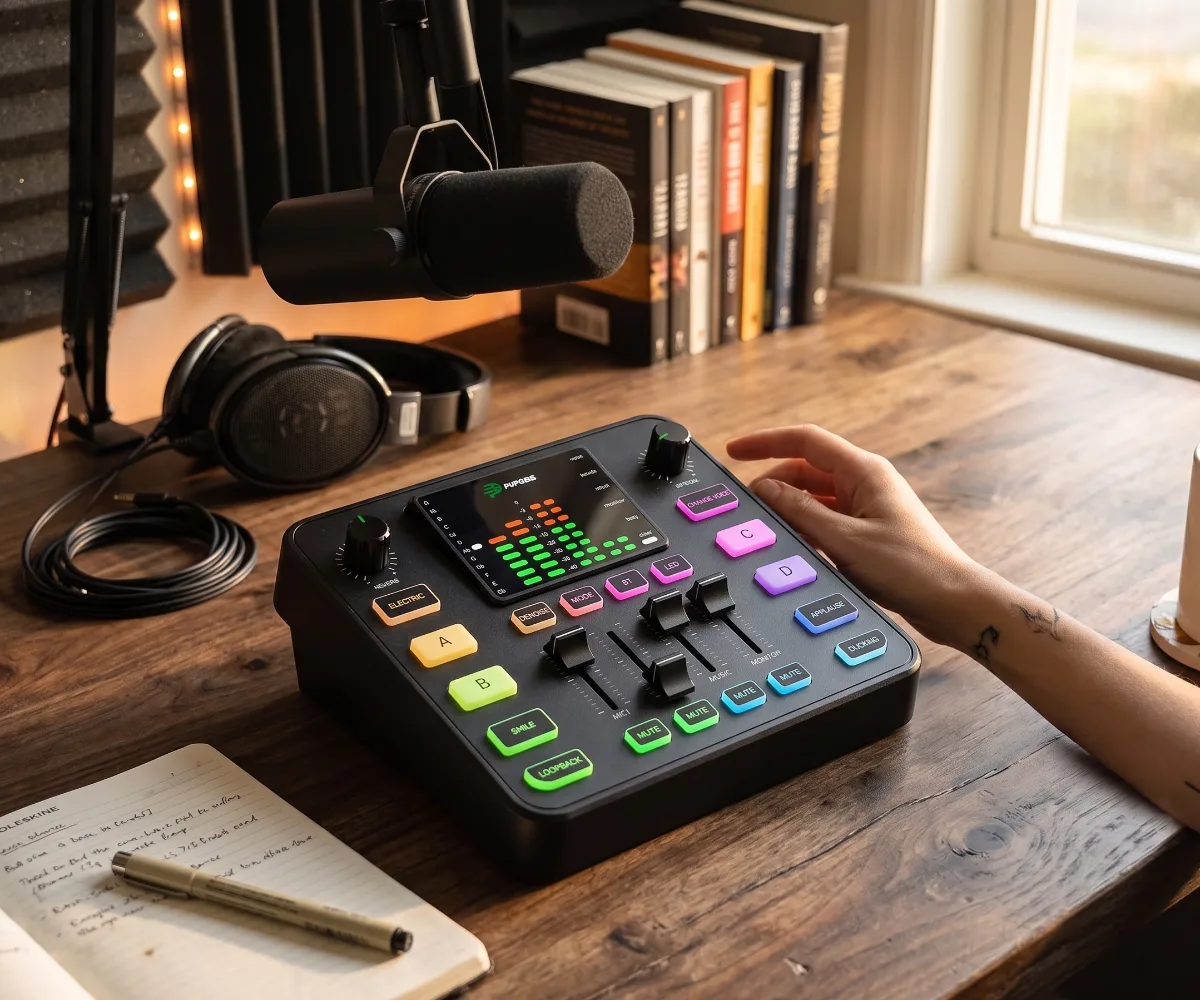
The Pupgsis Gaming Audio Mixer packs a 24-bit/48 kHz ADC, 48 V phantom power, and a 60 dB gain range into a 140 × 110 × 45 mm chassis that draws 500 mA from a single USB-C port. Its front panel combines a large gain knob with RGB ring, a 3.5 mm headphone jack for zero-latency monitoring, and dedicated mute and voice-effect buttons for robot, male-to-female pitch shift, and reverb presets.
Specs that matter (no marketing fluff):
- ADC/DAC: 24-bit / 48 kHz (not 16-bit like Behringer’s entry)
- Equivalent Input Noise: -122 dBu A-weighted — competitive with interfaces costing three times as much
- Max gain: 60 dB clean — enough for an SM7B at conversational distance
- Phantom power: 48 V, toggle on rear, LED indicator on front
- Headphone amp: 32 Ω–300 Ω, 30 mW per channel — drives DT 770 Pro 80 Ω loud enough
- Voice effects: 3 hardware presets (Robot, Pitch Shift ±12 semitones, Room Reverb) — zero CPU load
- RGB gain ring: Green ≤ -18 dBFS, Yellow -18 to -6 dBFS, Red > -6 dBFS — visual clipping warning
- USB-C port: USB 2.0 High Speed, UAC2 compliant, bus-powered
- Dimensions: 140 × 110 × 45 mm, 280 g — fits between keyboard and monitor
The gain knob’s RGB ring is genuinely useful, not just gamer bling. Green means you’re safe, yellow means you’re hot, red means you’re clipping — glanceable gain staging without opening OBS. The voice effects live in hardware DSP, so they add zero latency and zero CPU overhead. Robot and pitch-shift are novelty; the room reverb preset adds a subtle 300 ms tail that makes a dry bedroom vocal sound like a treated booth.
Pupgsis vs. The Budget Competition: What You Actually Gain
The Pupgsis sits in a weird sweet spot: cheaper than a Focusrite Solo, more streaming-focused than a Behringer UMC22, and the only sub-$60 box with hardware voice effects. The table below compares real-world specs that affect your stream.
| Feature | Motherboard Audio (Realtek ALC4080) | Pupgsis Gaming Audio Mixer | Typical $100–150 Interface (e.g., Focusrite Scarlett Solo 4th Gen) |
|---|---|---|---|
| ADC Resolution | 16-bit / 48 kHz | 24-bit / 48 kHz | 24-bit / 192 kHz |
| Preamp Gain | ~35 dB (line-in only) | 60 dB (XLR + 48 V) | 56 dB (XLR + 48 V) |
| Equivalent Input Noise | ~-90 dBu | -122 dBu A-weighted | -128 dBu A-weighted |
| Phantom Power | None | 48 V, rear toggle | 48 V, front toggle |
| Direct Monitoring | Software only (latency) | Hardware, zero-latency | Hardware, zero-latency |
| Hardware Mute | No | Yes, front panel | No (Gen 4 adds mute) |
| Voice Effects (DSP) | None | 3 presets, zero CPU | None |
| Visual Gain Meter | None | RGB ring (3 zones) | LED halo (Solo 4th Gen) |
| Power Draw | N/A (motherboard) | 500 mA @ 5 V (bus) | 500 mA @ 5 V (bus) |
| Driver Required | Yes (Realtek) | No (UAC2 class-compliant) | Yes (Focusrite Control 2) |
The Pupgsis beats motherboard audio on every metric that matters for streaming. Against a $130 Focusrite Solo 4th Gen, it trades 192 kHz sample rate and 6 dB lower noise for hardware mute, hardware voice effects, zero drivers, and $70+ saved. For a solo streamer on a broke budget, that’s the right trade.
Real-World Streaming Workflows: Where This Mixer Shines
The Pupgsis excels in three common scenarios: solo gaming streams with a dynamic mic, just-chatting sessions with a condenser, and dual-PC setups where the streaming PC needs a clean audio feed without driver fights.
Scenario 1: Dynamic mic (SM7B, PodMic, MV7X) on a single PC Plug XLR into the combo jack, engage 48 V off, crank gain to 45–50 dB. The 60 dB ceiling leaves headroom for whisper-quiet moments. RGB ring stays green at -18 dBFS; you’ll hit yellow only on excited screams. Hardware mute lets you cough without a hotkey. Round-trip latency measures 3.2 ms at 48 kHz / 256-sample buffer — imperceptible.
Scenario 2: Condenser mic (AT2020, NT1, Lewitt LCT 240) for ASMR / voiceover Flip rear phantom power to 48 V, wait 2 seconds for capsule bias, set gain to 25–30 dB. The -122 dBu EIN means the noise floor sits below -90 dBFS on a quiet source — clean enough for librivox-grade narration. Room reverb preset adds warmth without plugins.
Scenario 3: Dual-PC stream (gaming PC → streaming PC via USB) Because the Pupgsis is UAC2 class-compliant, the streaming PC sees it as a generic USB audio device. No Focusrite Control, no Realtek console, no kernel extensions. OBS on the streaming PC grabs 24-bit/48 kHz directly. The gaming PC stays free of audio drivers entirely.
Common Mistakes When Buying Your First Streaming Mixer
Mistake 1: Buying a 2-channel mixer for a solo stream. You pay for a second preamp you’ll never use. The Pupgsis’s single XLR/TRS combo jack covers 95% of solo creators.
Mistake 2: Ignoring gain range. A 45 dB max gain preamp cannot drive an SM7B without an inline booster. The Pupgsis’s 60 dB handles broadcast dynamics natively.
Mistake 3: Assuming “USB audio” means driverless. Many budget interfaces (Behringer U-Phoria, older Focusrite) require ASIO drivers on Windows. UAC2 compliance is the only guarantee of plug-and-play on every OS.
Mistake 4: Overlooking monitoring latency. Software monitoring through OBS adds 20–40 ms. Hardware direct monitoring is non-negotiable for vocal timing. The Pupgsis does it in analog domain — true zero latency.
Mistake 5: Chasing 192 kHz sample rates. Your stream encodes to 48 kHz AAC/Ogg Opus anyway. 24-bit depth matters; 192 kHz sample rate does not.
FAQ
Does the Pupgsis work with PlayStation 5 or Xbox Series X? Yes. Both consoles support UAC2 class-compliant USB audio devices. Plug the Pupgsis into a console USB port, set audio output to “USB Headset” in system settings, and the mixer becomes your mic input and headphone output. Voice effects and monitoring work identically to PC.
Can I use the Pupgsis with a wireless mic receiver like the DJI Mic or Rode Wireless GO II? Yes. Connect the receiver’s 3.5 mm TRS output to the Pupgsis’s combo jack using a TRS-to-XLR adapter cable. Set phantom power off. Gain range 20–35 dB typically suffices for line-level receiver outputs. The hardware mute button silences the wireless feed instantly.
How loud does the headphone amp get with 250 Ω headphones? The 30 mW per channel rating drives Beyerdynamic DT 770 Pro 250 Ω to ~105 dB SPL — loud enough for tracking over a loud game mix. At 80 Ω (DT 770 Pro 80 Ω) it reaches ~112 dB SPL. For 600 Ω headphones, volume maxes around 98 dB SPL; consider a dedicated amp if you monitor at concert levels.
Do the voice effects work in Discord, Zoom, and TikTok Live? Yes. Because effects are processed in the mixer’s DSP before the USB audio stream leaves the device, every application receives the effected signal natively. No virtual cables, no VoiceMeeter, no VST hosts. The Robot, Pitch Shift, and Reverb buttons toggle globally.
What happens if I accidentally leave 48 V phantom power on with a dynamic mic? No damage occurs. Professional dynamic mics (SM7B, RE20, PodMic, MV7X) are designed to tolerate 48 V phantom indefinitely. The Pupgsis’s rear toggle and front LED make the state obvious. Ribbon mics are the only exception — never apply phantom to a passive ribbon.
Is there a firmware update tool for the Pupgsis? As of 2026, the manufacturer provides a Windows-only firmware updater via their support page. Updates have addressed USB suspend/resume behavior on some AMD chipsets and tightened the RGB ring thresholds. Mac and Linux users must boot Windows to apply updates; the device itself stores firmware persistently.
Can I mount the Pupgsis on a boom arm or mic stand? The chassis lacks threaded inserts. Most users place it on the desk or use a 3D-printed cradle (STL files circulate on Thingiverse) that clamps to a 5/8”-27 mic stand thread. At 280 g, it’s light enough for a lightweight desk clamp without tipping.
Does the Pupgsis support stereo line-in for desktop audio capture? The 3.5 mm line-in jack accepts stereo signals at up to 2 Vrms. In OBS, configure the mixer as a 2-channel device: channel 1 = XLR mic, channel 2 = line-in (game audio, music, Discord). This lets you balance mic and desktop audio in hardware before the signal hits the stream encoder.
How does the Pupgsis compare to the GoXLR Mini for a new streamer? The GoXLR Mini (discontinued, used ~$130) offers motorized faders, more routing, and a superior app — but requires Windows-only drivers and external power. The Pupgsis is bus-powered, driverless, cross-platform, and $70 cheaper new. For a first mixer in 2026, the Pupgsis removes more friction.
Will the RGB gain ring distract me in a dark room? The ring brightness is fixed at a moderate level — visible in daylight, not blinding at night. No software dimmer exists. A small piece of matte scotch tape over the ring diffuses it to a subtle glow if you find it distracting during horror game streams.
What cable comes in the box? A 1.5 m USB-C to USB-A cable (USB 2.0 spec) and a 3.5 mm TRS to dual 6.35 mm TS breakout cable for line-in. No XLR cable is included — budget $8–12 for a decent 3 m XLR male-to-female (Mogami Gold, Canare Star Quad, or Amazon Basics all work).
The picks
Pupgsis Gaming Audio Mixer, Audio Interface for pc,1/4" TRS Dynamic Mic interface,Sound Board With voice changer, Pro-Preamp, Noise Cancellation, RGB, Bluetooth For Streaming/Podcasting/Gaming
With its flashy RGB lights and built‑in voice changer, this mixer lets you sound like a robot DJ while your stream looks like a rave.
- Plug‑and‑play USB connection
- Effective noise‑cancelling preamp
- Bluetooth for wireless audio playback
- Only one XLR/TRS mic input limits multi‑mic setups
#ad · As an Amazon Associate we earn from qualifying purchases.
Explore more Desk & WFH finds →
Questions you were too broke to ask
How do I connect the Pupgsis audio mixer to my PC for streaming? +
Plug the USB cable into your PC, set it as the default input/output in your streaming software, and connect your mic to the 1/4" TRS jack.
Does the Pupgsis mixer work with consoles like PlayStation or Xbox? +
It’s primarily designed for PC via USB; console use requires an adapter and may limit some features.
Can I use the Pupgsis mixer for podcasting with multiple mics? +
It offers a single 1/4" TRS input, so it’s best for one mic; for multiple mics you’d need a separate splitter or a multi‑channel interface.

Jonathan Moreno · Founder & Curator
Jonathan Moreno is the founder and curator behind Broke But Fancy. Part deal-hunter, part aesthetics addict, he vets every find so your space looks expensive while your bank account quietly recovers. Champagne taste, tap-water budget — professionally.
Meet the curator